Unit 4: FMR Data Validation: Using the API

In this unit, we'll take a closer look at the capabilities of the FMR to automate structural validation via the API. We'll also explore using synchronous and asynchronous API capabilities, along with various API parameters and what they do. Finally, we'll examine the structure of the API validation report.
The FMR API
FMR is primarily concerned with structural metadata and therefore supports structure queries but does not support data queries. The FMR implements a subset of the SDMX RESTful API specification, as illustrated here.
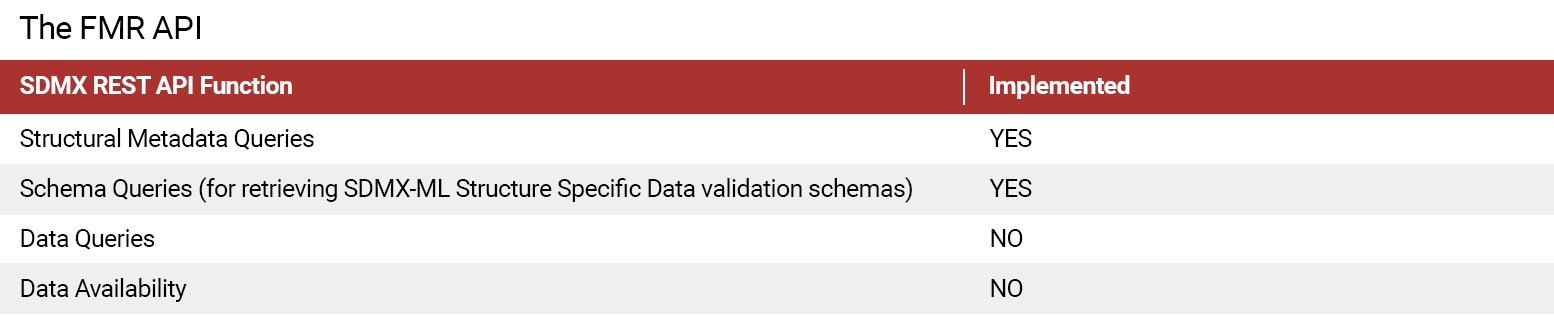
Select the table to enlarge.
The FMR API provides additional functions that are necessary for a practical registry implementation, but not explicitly provided for in SDMX standard REST specification.
The table below provides more details regarding FMR API function and purpose.
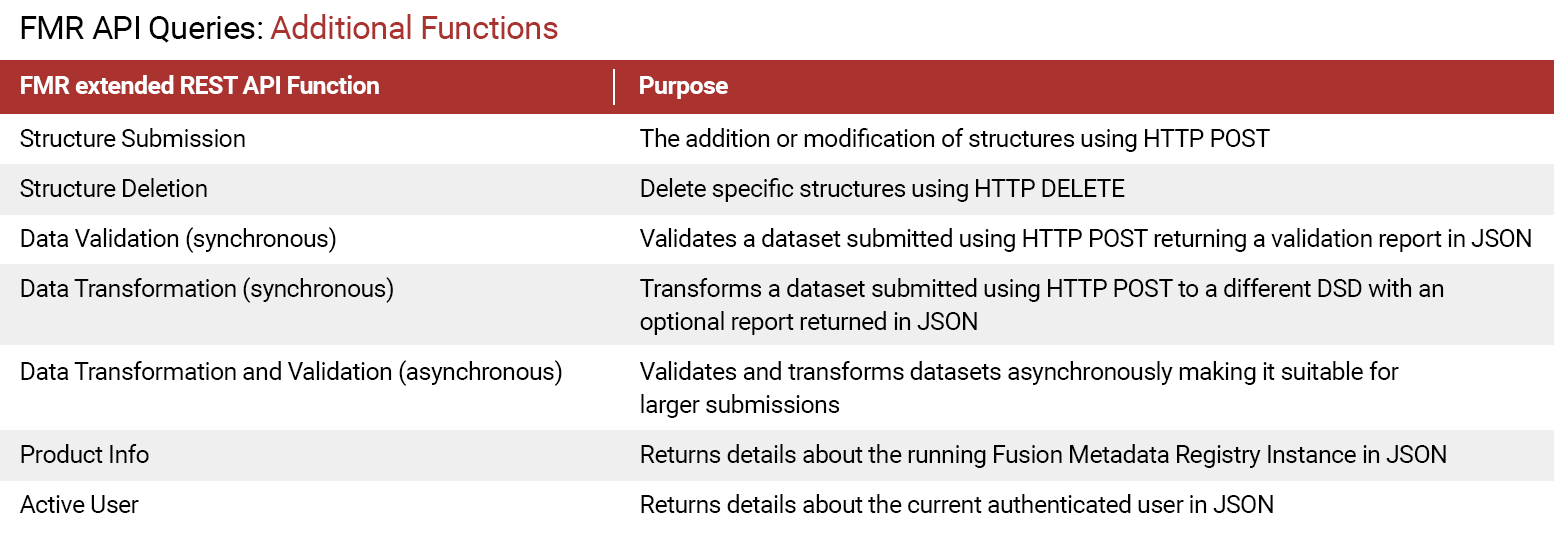
Select the table to enlarge.
Please see the References section at the end of this module for more information.
FMR data validation REST API – options for use
When examining FMR API capabilities, there are a couple of options for use.
Select each use case example to learn more.
Please see the References section at the end of this module for more information in each of these use cases.

POST to /ws/public/data/validate
- Response is JSON validation report
- Optionally also receive:
- Invalid series
- Valid series

POST to /ws/public/data/load
- Response is a batch job token
GET the job status
/ws/public/data/loadStatus
- Response is JSON validation report
GET the transformed dataset
/ws/public/data/download
Using FMR's REST API to validate a data set
In the previous unit, we illustrated how data validation and conversion follow three steps: data in; validate; and data out. The specific details change depending on whether you are using the UI, the synchronous API, or the asynchronous API, but the fundamental principles remain the same.
In the video shown here, we'll illustrate and describe the various steps.
Select Play to begin.
Becoming familiar with using the API
An easy way to become familiar with using the FMR API and the various options available is to try various parameters using the UI in publicly available FMR registries like SDMX Global Registry and SDMX.IO Sandbox Registry.
Below are two programming languages often discussed when using FMR API.
Select each one for details.

Automate using CURL, a command-line tool in Windows, MacOS, and Linux:
curl -X GET "copy-paste-QUERY-URL-from-registry"
Automate using PYTHON. The "requests" library works very well.
import requests
response = requests.get("copy-paste-QUERY-URL-from-registry")
print (response.text)
A closer look at synchronous web services
Let's now consider an example of validating data in action. In this short video, we'll examine a few examples of synchronous web services. Examples using asynchronous web services will be provided later in the module.
Select Play to begin.
To access the code presented in this video, click here.
FMR Data processing services – API parameters
Now let's turn our attention to specific API parameters relating to FMR data processing services. Review each of the tables that follow, which may be used as a reference when defining API calls.
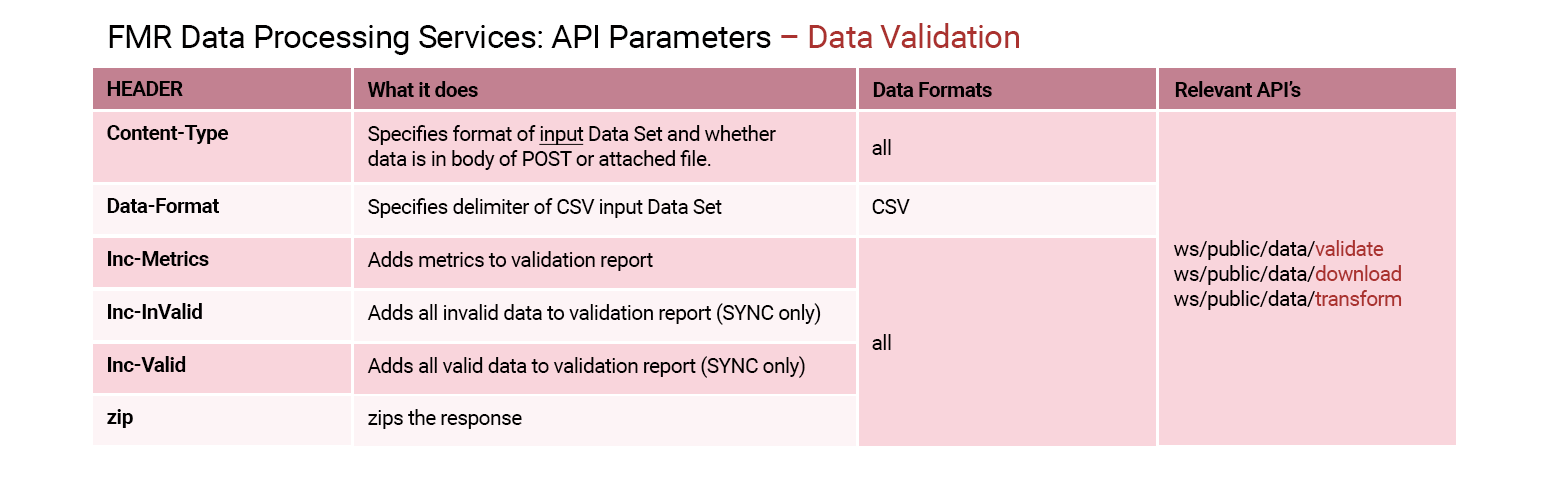
Select the data validation chart to enlarge.

Select the data conversion chart to enlarge.
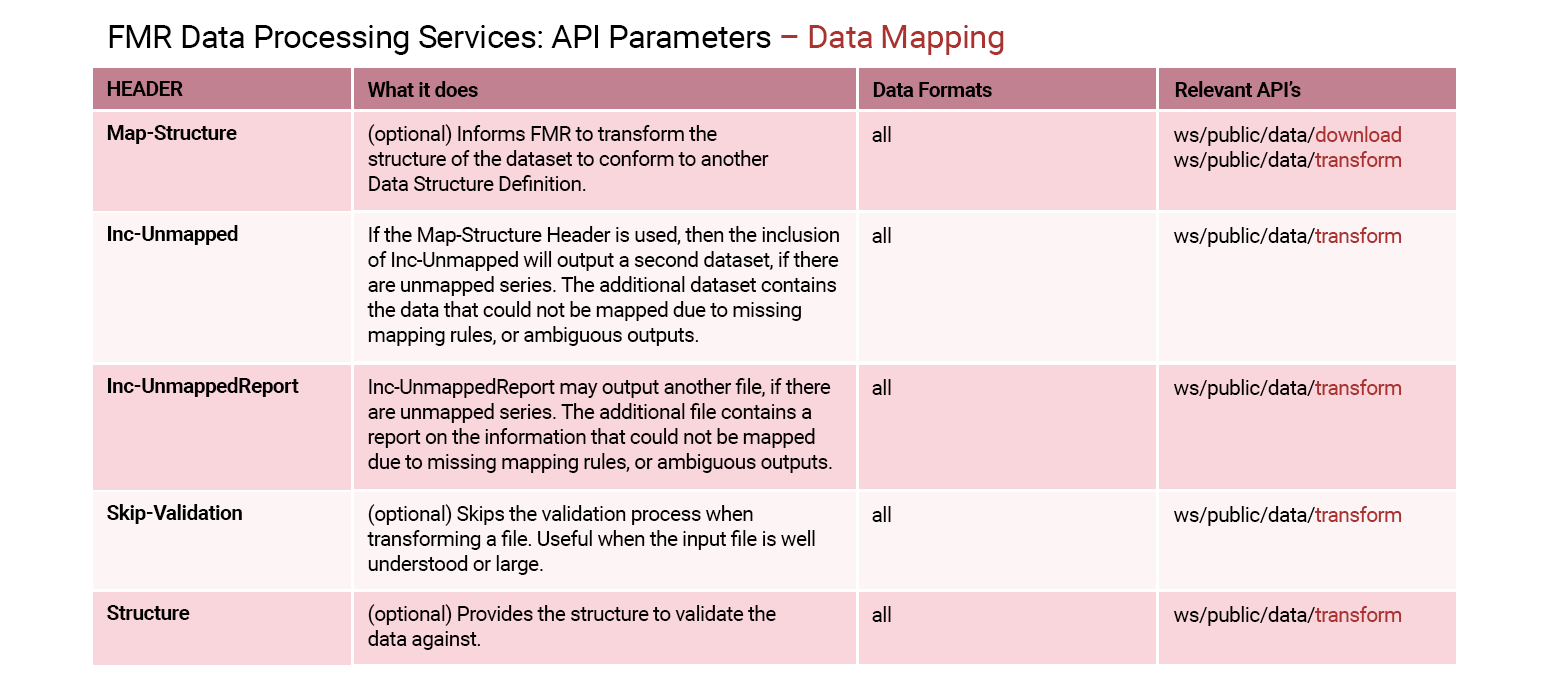
Select the data mapping chart to enlarge.
A closer look at API parameters
This short video illustrates a few examples of data validation using different API parameters. In this short video, we'll examine a few examples of asynchronous web services.
Select Play to begin.
To access the code presented in this video, click here.
What do you know?
Which type of API more closely resembles the discrete steps required in the UI.
Select your answer and then select Submit.
The asynchronous API more closely resembles the discrete steps required in the UI. There is an initial data in process which is undertaken by the "load" API endpoint. Once loaded, there is a validation, conversion, and download process which are undertaken in one step using the "download" API endpoint.
The correct answer is option 1.
The asynchronous API more closely resembles the discrete steps required in the UI. There is an initial data in process which is undertaken by the "load" API endpoint. Once loaded, there is a validation, conversion, and download process which are undertaken in one step using the "download" API endpoint.
Reviewing a validation report
Before we conclude, let's take a moment to review a final video demonstrating the process of reviewing the JSON validation report.
Select Play to begin.
To access the code presented in this video, click here.
Need help finding something? I am an AI Assistant that's here to help!
Welcome to SDMX AI assistant
What are you looking for?
By using this AI-powered service ("Service"), you acknowledge and agree to the following:
This Service uses generative AI to assist with statistical analysis and research. While the Service strives to deliver useful information, the output ("Output") may contain inaccuracies, omissions, or biases. The Output is provided for informational purposes only and should not be considered professional advice. You remain responsible for how you interpret and use the Output.
The BIS makes no warranties regarding the accuracy or completeness of the Output and accepts no liability for any loss or damage resulting from its use.
Do not include or share personal, private, confidential or proprietary information when using the Service.
By using this technology, you agree to the Terms and Conditions.
How the assistant can help you
Understand SDMX standards
Ask and get clear explanations about SDMX standards.
Navigate the website
Find tools and documentation on website quickly.
Explore SDMX tools
Ask about API, software and libraries supporting SDMX.
Access documentation
Locate technical guides, specifications, and FAQs.