Unit 3: FMR Data Validation: Using the UI

In this unit, we'll cover the FMR validation process flow when validating data using the UI.
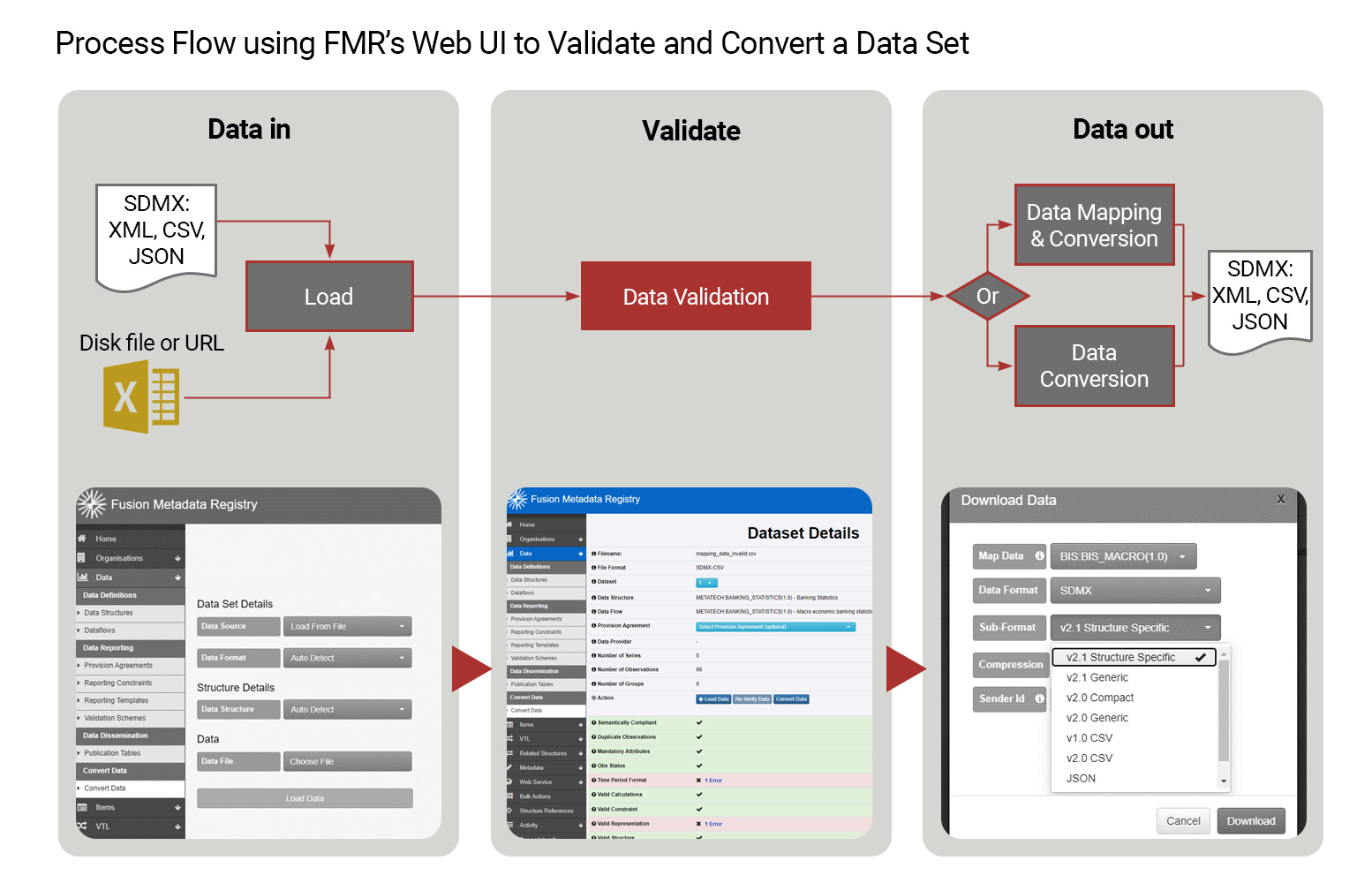
Process flow using FMR's web UI to validate and convert a data set
FMR validation process flow follows three common steps, regardless of whether you are validating data using the UI or if you are validating the data using the API.
Step 1 specifies the data to be validated. Using the UI, this process step in initiated by selecting the "Convert Data" option in the LHS menu and ends once the "Load Data" button is selected.
Step 2 is where the data validation occurs. This process step is initiated when the "Load Data" button is selected at the end of Step 1. Step 2 ends when the Validation Summary for each of the 9 validation rules is displayed at the bottom of the FMR window.
Step 3 is where data mapping and/or conversion occurs. This process step is initiated when the "Convert Data" button is pressed and ends when the "Download" button is pressed.
You will see later in the next unit how the validating and converting data follows the same logical sequence when using the API.
Select the image to enlarge.
A closer look at validating and converting datasets
Let's now consider an example of validating and converting datasets in action. In this short video, we'll examine a few examples using the UI.
Select Play to begin.
To access the code presented in this video, click here.
What do you know?
Now, try this question.
What initiates process step 2 when data validation occurs using the UI?
Select your answer and then select Submit.
Step 2 is where the data validation occurs. This process step is initiated when the "Load Data" button is selected at the end of Step 1.
The correct answer is option 3.
Step 2 is where the data validation occurs. This process step is initiated when the "Load Data" button is selected at the end of Step 1.
Coming next
In the next unit, we'll focus on the capabilities of the FMR to automate structural validation via the API.
Need help finding something? I am an AI Assistant that's here to help!
Welcome to SDMX AI assistant
What are you looking for?
By using this AI-powered service ("Service"), you acknowledge and agree to the following:
This Service uses generative AI to assist with statistical analysis and research. While the Service strives to deliver useful information, the output ("Output") may contain inaccuracies, omissions, or biases. The Output is provided for informational purposes only and should not be considered professional advice. You remain responsible for how you interpret and use the Output.
The BIS makes no warranties regarding the accuracy or completeness of the Output and accepts no liability for any loss or damage resulting from its use.
Do not include or share personal, private, confidential or proprietary information when using the Service.
By using this technology, you agree to the Terms and Conditions.
How the assistant can help you
Understand SDMX standards
Ask and get clear explanations about SDMX standards.
Navigate the website
Find tools and documentation on website quickly.
Explore SDMX tools
Ask about API, software and libraries supporting SDMX.
Access documentation
Locate technical guides, specifications, and FAQs.