Unit 3: Using FMR Workbench to Manage .Stat Suite Structural Metadata

This unit covers installing, configuring, and integrating FMR Workbench with .Stat Suite. You'll learn how to set up Environments, configure connections, and integrate with the .Stat DLM. The unit also explores the impact of seamless integration on managing SDMX structural metadata and provides step-by-step guidance for implementation.
Installing FMR Workbench
To use FMR Workbench, you first need to install and set it up. This process involves downloading Docker Desktop, pulling the latest FMR Workbench image, creating a container, and accessing the user interface through a web browser.
1. Download and install Docker Desktop (if not already installed)
2. Download the latest fwb image (at the windows shell or command prompt)
docker pull sdmxio/fwb:latest3. Create a container called "fwb" and start the fwb app.
docker run -p8080:8080 --name fwb sdmxio/fwb:latest4. Access the FMR UI by opening https://localhost:8080/ in your web browser.
Configuring FMR Workbench

To edit the configuration file, use the following command:
docker exec -it fwb /usr/bin/vi /root/MetadataTechnology/FusionRegistry/fwb_config.json(Note: This command uses the "vim editor" and standard vim commands.)
Once finished, restart the Docker container to apply the revised settings:
docker restart fwbConfiguring FMR Workbench Environments

Each SDMX service offering includes a set of related SDMX web services, such as the following:
- Web service entry point to retrieve the structures
- Entry point to save structures
- Entry point to delete structures
The list of available Environments is defined in the configuration file for FMR Workbench. The connected Environment is associated with the current user, enabling multiple users to connect to different Environments simultaneously.
More on FMR Workbench configuration
This section provides an overview of how FMR Workbench is configured to work with .Stat Suite. It includes:
- An example of a .Stat Suite configuration in FMR Workbench
- Key notes on .Stat Suite configuration settings
- A description of the FMR Workbench configuration file
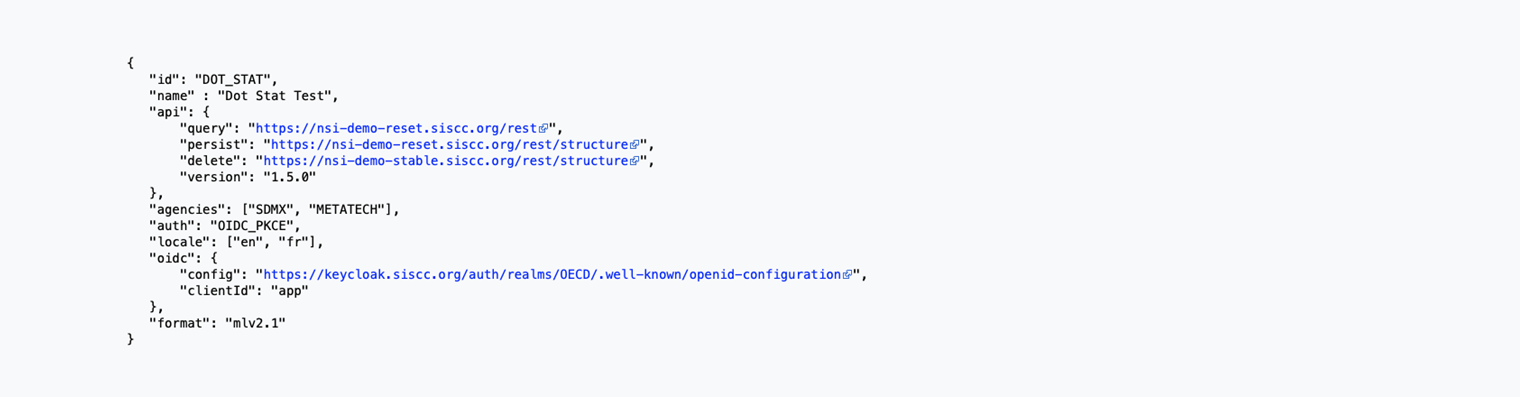
Select the image to enlarge.
The .Stat Suite configuration in FMR Workbench includes specific settings that must be correctly defined:
- "id" – Specifies the .Stat data space to connect to.
- "api.version" – Should be set to "1.5.0".
- "agencies" – Must align with the agencies used in .Stat metadata.
- "locale" – Should match the desired locales in the .Stat data space.
- "api.timeout" – Should be increased to 600.
- "format" – Should be set to "mlv2.1".
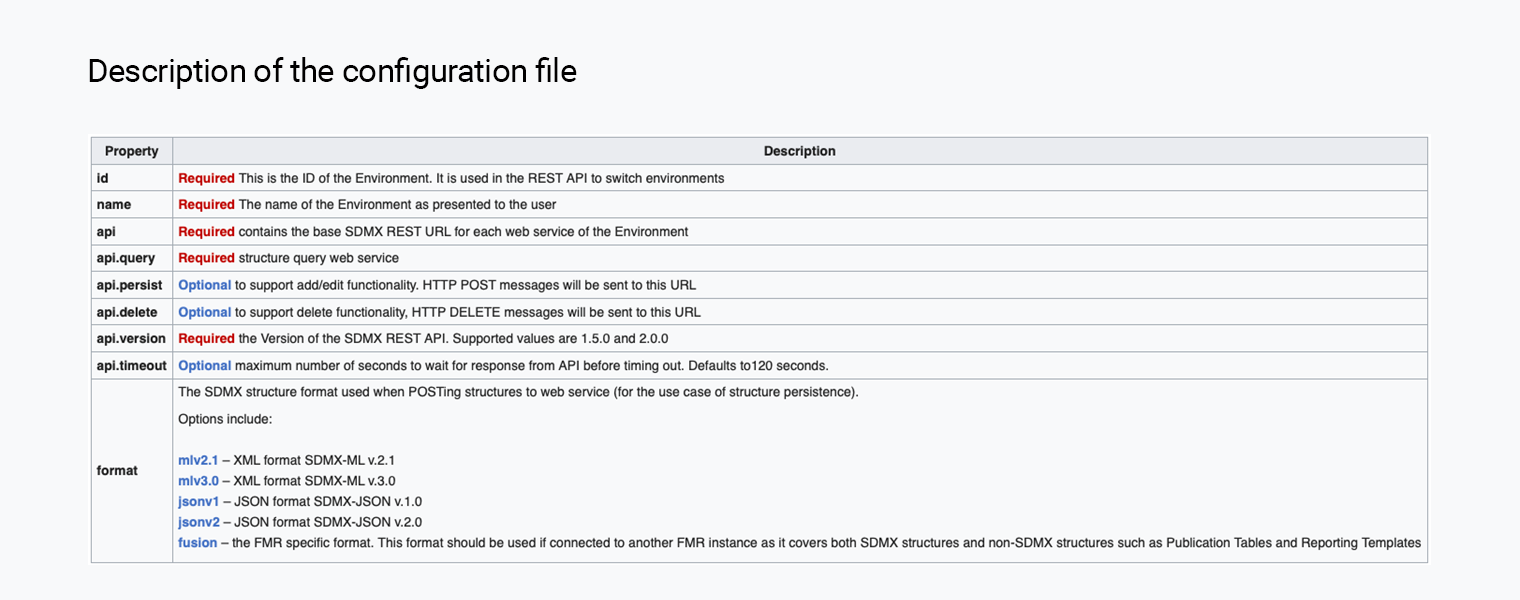
Select the image to enlarge.
Seamless integration of FMR Workbench and .Stat Suite

So far, you have seen how to configure FMR Workbench to connect to a .Stat Suite data space and manage SDMX structural metadata.
As of the "JS arc" release, the FMR Workbench web application can be seamlessly integrated with the .Stat DLM. This integration enables structure creation and editing directly within the .Stat DLM UI.
Version Compatibility: Supported as of the June 13, 2024, release of .Stat Suite JS arc.
Impact of seamless integration
The integration of FMR Workbench with .Stat DLM enhances metadata management by adding new features. This includes improved structure creation and editing options directly within the .Stat DLM UI
Select each option below to reveal the details.
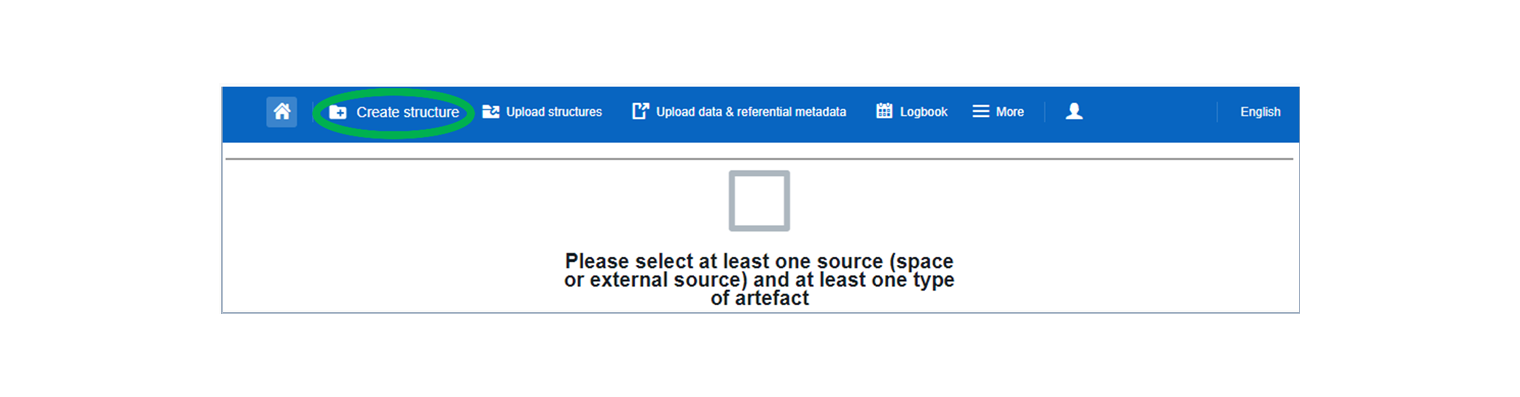
Select the image to enlarge.
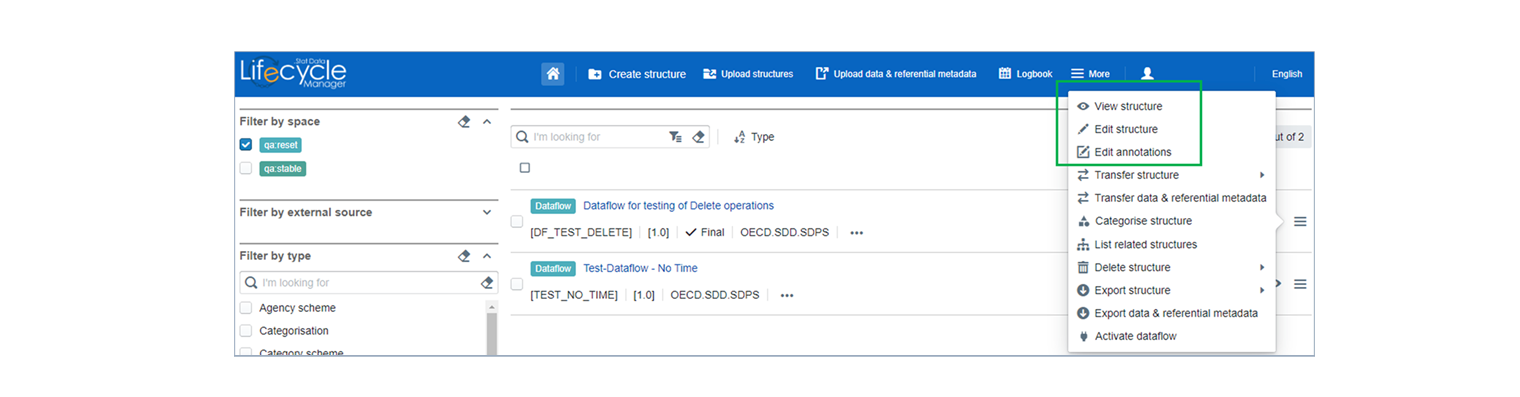
Select the flow chart to enlarge.
How to seamlessly integrate FMR Workbench and .Stat Suite
To integrate FMR Workbench with .Stat Suite, specific configuration changes are required in both .Stat Suite and FMR Workbench settings.
In .Stat Suite configuration, update the dotstatsuite-config-data/<env>/configs/tenants.json file under the DLM scope:
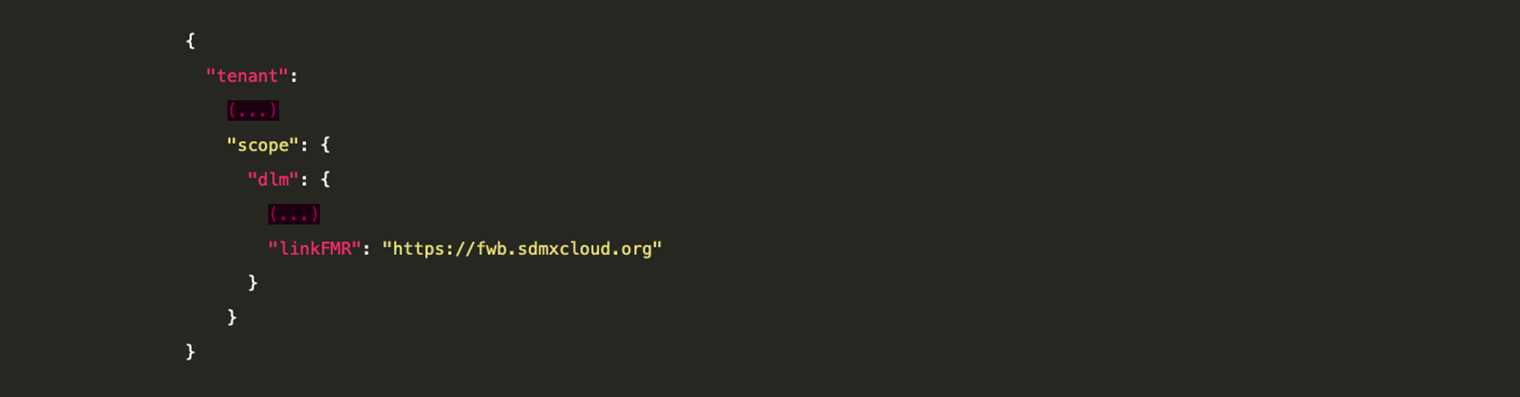
Select the image to enlarge.
In FMR Workbench configuration, provide the required details in the .json configuration file for .Stat DLM dataspaces and authentication. These steps and settings remain the same as previously explained.
Knowledge check
Which of the following statements about configuring FMR Workbench are correct?
Select all that apply and then select Submit.
FMR Workbench requires proper authentication and configuration settings for seamless operation. While it supports multiple file formats, the connected service may not support all features available in the UI.
The correct answers are options 1, 3 and 4.
FMR Workbench requires proper authentication and configuration settings for seamless operation. While it supports multiple file formats, the connected service may not support all features available in the UI.
The correct answers are options 1, 3 and 4.
FMR Workbench requires proper authentication and configuration settings for seamless operation. While it supports multiple file formats, the connected service may not support all features available in the UI.
Need help finding something? I am an AI Assistant that's here to help!
Welcome to SDMX AI assistant
What are you looking for?
By using this AI-powered service ("Service"), you acknowledge and agree to the following:
This Service uses generative AI to assist with statistical analysis and research. While the Service strives to deliver useful information, the output ("Output") may contain inaccuracies, omissions, or biases. The Output is provided for informational purposes only and should not be considered professional advice. You remain responsible for how you interpret and use the Output.
The BIS makes no warranties regarding the accuracy or completeness of the Output and accepts no liability for any loss or damage resulting from its use.
Do not include or share personal, private, confidential or proprietary information when using the Service.
By using this technology, you agree to the Terms and Conditions.
How the assistant can help you
Understand SDMX standards
Ask and get clear explanations about SDMX standards.
Navigate the website
Find tools and documentation on website quickly.
Explore SDMX tools
Ask about API, software and libraries supporting SDMX.
Access documentation
Locate technical guides, specifications, and FAQs.