Unit 1: FMR Workbench vs FMR

This unit introduces the FMR Workbench, highlighting its purpose, key features, and how it compares to FMR. You'll explore its use cases, strengths, and the differences between the two platforms in metadata management.
What is FMR Workbench?

The UI of the FWB is a stripped-down version of the Fusion Metadata Registry (FMR) UI.
It is stripped down because:
- FWB supports the use case of viewing and maintaining structural metadata
- FMR supports additional use cases, including data validation, data transformation, data conversion, and administrative UI pages
FMR Workbench use case example
The FMR Workbench is a remote registry browser and metadata maintenance tool that extends the strengths and capabilities of the FMR User Interface to any SDMX-compliant registry implementing an SDMX RESTful API.
A key use case for FMR Workbench users is the ability to connect to .Stat Suite spaces for browsing and maintaining .Stat Suite structural metadata.
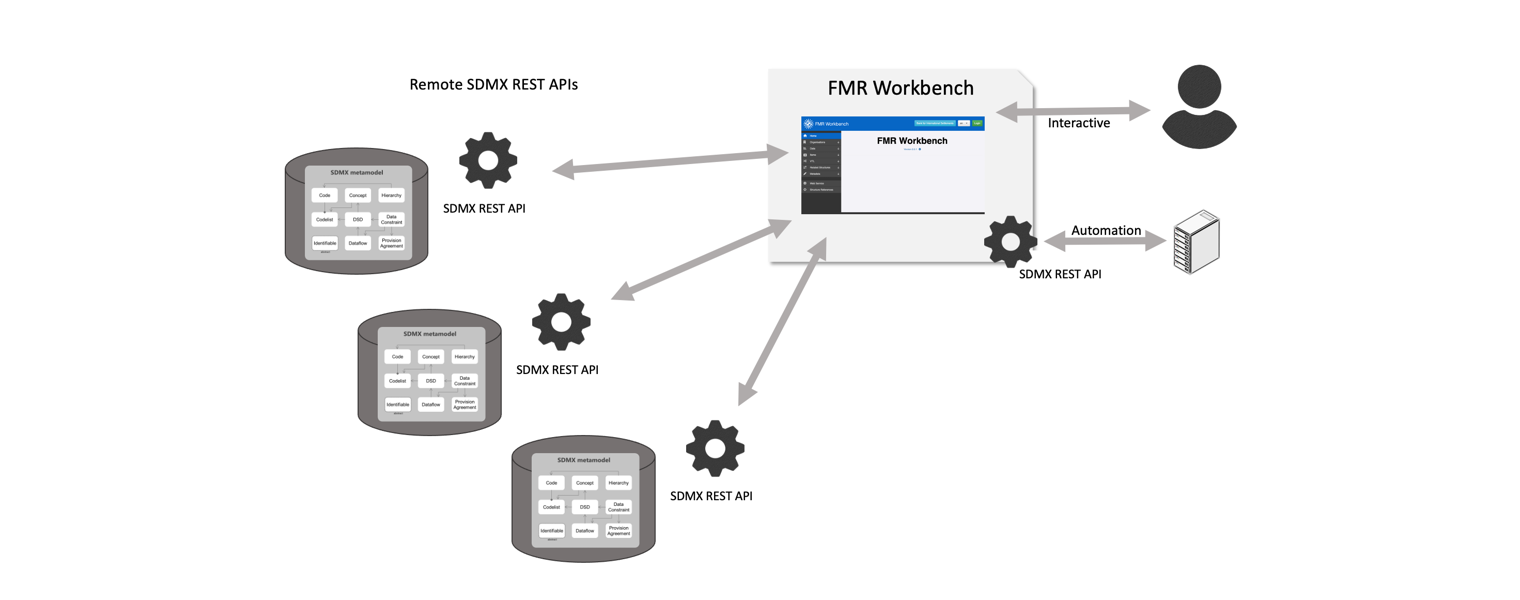
Select the image to enlarge.
What is FMR Workbench used for?
The FMR Workbench User Interface browses and displays the SDMX structures of the Environment it is connected to.
An Environment is a connection to a collection of related SDMX web services for a single SDMX service offering.
The Fusion Metadata Registry (FMR) Web User Interface was adopted and reused for FMR Workbench UI due to its strengths, including:
- User-friendly design
- Suitable for both SDMX experts and non-experts
- Wizard mode for guided workflows
- Support for manual manipulations
FMR vs FMR Workbench
FMR and FMR Workbench (FWB) share the same SDMX structural metadata registry engine and UI.
The FMR User Interface supports viewing and maintaining structural metadata, in addition to use cases for data validation, data conversion, data mapping, and administration. The FWB User Interface is a minimised version that supports viewing and maintaining structural metadata.
FMR provides compliant SDMX v1 and v2 REST API web services. FWB relies on external compliant SDMX v1 or v2 REST API web services but also exposes those APIs via its own v1 and v2 REST API (where possible).
The FMR UI acts upon its own local repository. The FWB UI connects to and acts upon any SDMX-compliant web services (structure only, not data).
In FMR, persistence of the registry content is integrated into the webapp, which uses a MySQL, SQL Server, or Oracle SQL database for storage. FWB, however, delegates persistence to decoupled SDMX structure repositories (e.g., .Stat Suite Spaces) and does not have any database requirements.
FMR uses a database to store its configuration settings. FWB configuration is stored in a file.
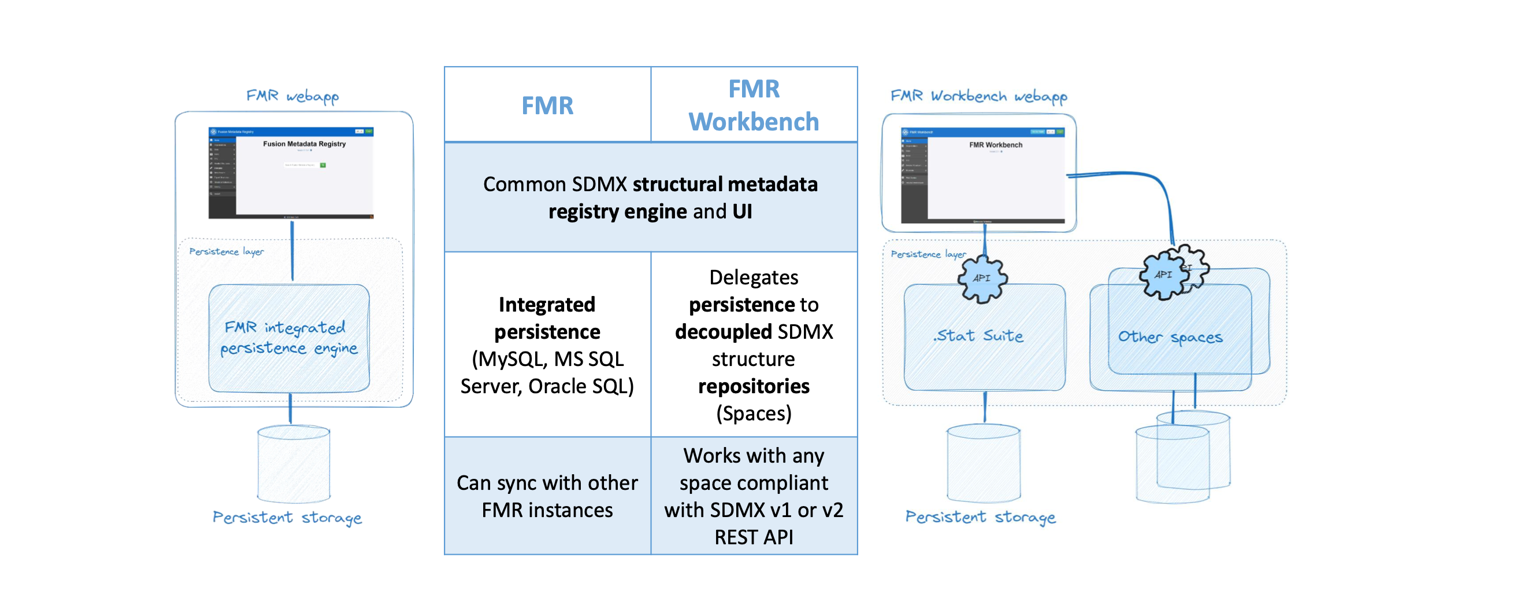
Select the image to enlarge.
Knowledge check
Which of the following statements about FMR Workbench (FWB) and Fusion Metadata Registry (FMR) are correct?
Select all that apply and then select Submit.
Both FMR and FMR Workbench (FWB) share the same SDMX structural metadata registry engine and UI, but FMR supports additional functions like data validation and uses an integrated persistence engine. FWB, however, relies on external SDMX-compliant services and stores its configuration in a file.
The correct answers are options 1, 2 and 4.
Both FMR and FMR Workbench (FWB) share the same SDMX structural metadata registry engine and UI, but FMR supports additional functions like data validation and uses an integrated persistence engine. FWB, however, relies on external SDMX-compliant services and stores its configuration in a file.
The correct answers are options 1, 2 and 4.
Both FMR and FMR Workbench (FWB) share the same SDMX structural metadata registry engine and UI, but FMR supports additional functions like data validation and uses an integrated persistence engine. FWB, however, relies on external SDMX-compliant services and stores its configuration in a file.
Coming next
In the next unit, you'll learn how FMR Workbench navigates, exports, creates, and modifies metadata. The unit covers query handling, SDMX web services, and feature limitations in different formats.
Need help finding something? I am an AI Assistant that's here to help!
Welcome to SDMX AI assistant
What are you looking for?
By using this AI-powered service ("Service"), you acknowledge and agree to the following:
This Service uses generative AI to assist with statistical analysis and research. While the Service strives to deliver useful information, the output ("Output") may contain inaccuracies, omissions, or biases. The Output is provided for informational purposes only and should not be considered professional advice. You remain responsible for how you interpret and use the Output.
The BIS makes no warranties regarding the accuracy or completeness of the Output and accepts no liability for any loss or damage resulting from its use.
Do not include or share personal, private, confidential or proprietary information when using the Service.
By using this technology, you agree to the Terms and Conditions.
How the assistant can help you
Understand SDMX standards
Ask and get clear explanations about SDMX standards.
Navigate the website
Find tools and documentation on website quickly.
Explore SDMX tools
Ask about API, software and libraries supporting SDMX.
Access documentation
Locate technical guides, specifications, and FAQs.