Unit 5: Use Case #2 – One-to-Many Mapping

In this unit, we'll take a closer look at a second use case involving one-to-many mapping.
One-to-many mapping explained
In our second use case of transcoding data, we focus on a one-to-many mapping challenge along with possible solutions and a moment to reflect on each approach.
Select each option below to explore the details.
The source dataset has the dimensions with ID "FREQ", "REF_AREA", and "INDICATOR".
Indicator dimension
The INDICATOR dimension uniquely defines a series (Example: INDICATOR1, INDICATOR2, INDICATOR3).
Target DSD
The Target DSD has FREQ and REF_AREA but splits INDICATOR into multiple dimensions: SEX, EDUCATION_LEVEL, STATISTICAL_UNIT.
Mapping rules
The mapping rules split the unique key:
- INDICATOR1 maps to FREQ:A, REF_AREA:UK, SEX:_T, EDU_LEVEL=PRIMARY, STAT_UNIT=ENROLMENT
- INDICATOR2 maps to FREQ:A, REF_AREA:UK, SEX:F, EDU_LEVEL=PRIMARY, STAT_UNIT=ENROLMENT
- INDICATOR3 maps to FREQ:A, REF_AREA:UK, SEX:M, EDU_LEVEL=PRIMARY, STAT_UNIT=ENROLMENT
- Component map 1: Source=INDICATOR Target=SEX
- Component map 2: Source=INDICATOR Target=EDU_LEVEL
- Component map 3: Source=INDICATOR Target=STAT_UNIT
Each component map is backed by a representation map, which maps the value of the Unique Key to the output as follows:
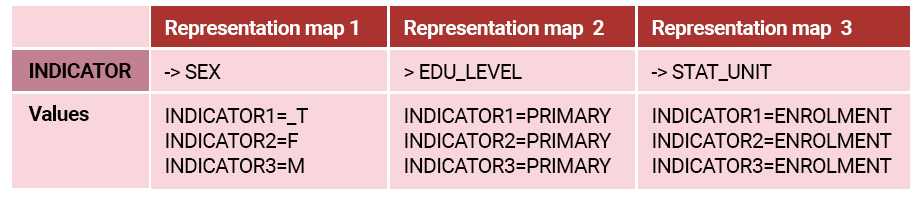
Select the representation map to enlarge.
A single representation map is required to map each INDICATOR to the three outputs.
INDICATOR -> SEX:EDU_LEVEL:STAT_UNIT
Values:
- INDICATOR1=_T:PRIMARY:ENROLMENT
- INDICATOR2=F:PRIMARY:ENROLMENT
- INDICATOR3=M:PRIMARY:ENROLMENT
One-to-many mapping in action
Now let's take a look at an example of one-to-many mapping in action. In this short video, we'll examine creating the structures in FMR and then transcoding the datafiles using the API – sync & async.
Select Play to begin.
To access the code presented in this video, click here.
Coming next
In the next unit, we'll go over the third use case scenario involving many-to-one mapping.
Need help finding something? I am an AI Assistant that's here to help!
Welcome to SDMX AI assistant
What are you looking for?
By using this AI-powered service ("Service"), you acknowledge and agree to the following:
This Service uses generative AI to assist with statistical analysis and research. While the Service strives to deliver useful information, the output ("Output") may contain inaccuracies, omissions, or biases. The Output is provided for informational purposes only and should not be considered professional advice. You remain responsible for how you interpret and use the Output.
The BIS makes no warranties regarding the accuracy or completeness of the Output and accepts no liability for any loss or damage resulting from its use.
Do not include or share personal, private, confidential or proprietary information when using the Service.
By using this technology, you agree to the Terms and Conditions.
How the assistant can help you
Understand SDMX standards
Ask and get clear explanations about SDMX standards.
Navigate the website
Find tools and documentation on website quickly.
Explore SDMX tools
Ask about API, software and libraries supporting SDMX.
Access documentation
Locate technical guides, specifications, and FAQs.