Unit 3: Reading and Writing SDMX Datasets

In this unit, we'll cover reading and writing SDMX datasets using pysdmx in SDMX-CSV 2.0 and SDMX-ML 2.1 formats.
Introduction to reading and writing SDMX datasets
Reading and writing SDMX datasets is a core functionality of any SDMX library.
Select each option below to learn more about some considerations.
Reading data
To read data, the read_sdmx function or the get_datasets functions are recommended:
pysdmx.io.read_sdmx(sdmx_document, validate=True)
Reads any SDMX message and returns a dictionary.
Parameters:
- sdmx_document (Union[str, Path, BytesIO]) – Path to file (pathlib.Path), URL, or string.
- validate (bool) – Validate the input file (only for SDMX-ML).
Return type: Message
Returns: A dictionary containing the parsed SDMX data or metadata.
Raises:
- Invalid – If the file is empty or the format is not supported.
A typical example to read data from a file, a string or a buffer, using read_sdmx:
from pysdmx.io import read_sdmx
# A simple pysdmx example to call a registry.
file_path = Path(\_\_file\_\_).parent / "sample.csv"

#Read from file
data_msg = read_sdmx(file_path)

#Read from URL
data_msg = read_sdmx("https://example.com/sample.csv")

#Extracting the datasets (list of Dataset)
datasets = data_msg.data

#Accessing the data of the test dataset by its Short URN
df = data_msg.get_dataset("DataStructure=TEST_AGENCY:TEST_ID(1.0)").data

#Accessing the data of the test dataset by its position in the SDMX Message
df = data_msg.data\[0\].data
Supported structures formats are: - SDMX-ML 2.1 Structures
Supported webservices submissions are: - SDMX-ML 2.1 RegistryInterface (Submission) - SDMX-ML 2.1 Error (raises an exception with the error content)
Supported data formats are: - SDMX-ML 2.1 - SDMX-CSV 1.0 - SDMX-CSV 2.0
The get_datasets function associates a dataset to its Schema:
pysdmx.io.get_datasets(data, structure=None, validate=True)
Reads a data message and a structure message and returns a dataset.
Parameters:
- data (Union[str, Path, BytesIO]) – Path to file (pathlib.Path), URL, or string for the data message.
- structure (Union[str, Path, BytesIO, None]) – Path to file (pathlib.Path), URL, or string for the structure message, if needed.
- validate (bool) – Validate the input file (only for SDMX-ML).
Return type: Sequence[Dataset]
Returns: A sequence of Datasets
Raises:
- Invalid – If the data message is empty or the related data structure (or dataflow with its children) is not found.
- NotFound – If the related data structure (or dataflow with its children) is not found.
from pysdmx.io import get_datasets

# Read file from the same folder as this code (SDMX-CSV 2.0)
data_path = Path(__file__).parent / "sample.csv"

# Data contains a reference to the dataflow ``Dataflow=MD:TEST(1.0)``
datasets = get_datasets(data_path)

print(datasets[0].structure)  # Outputs a string with the Schema Short URN -> "Dataflow=MD:TEST(1.0)"

# Reading the datasets and associating the schema
datasets = get_datasets(data_path, "https://example.com/dataflow/MD/TEST/1.0?references=descendants")

print(datasets[0].structure)  # Outputs a Schema object with the associated components
Writing data
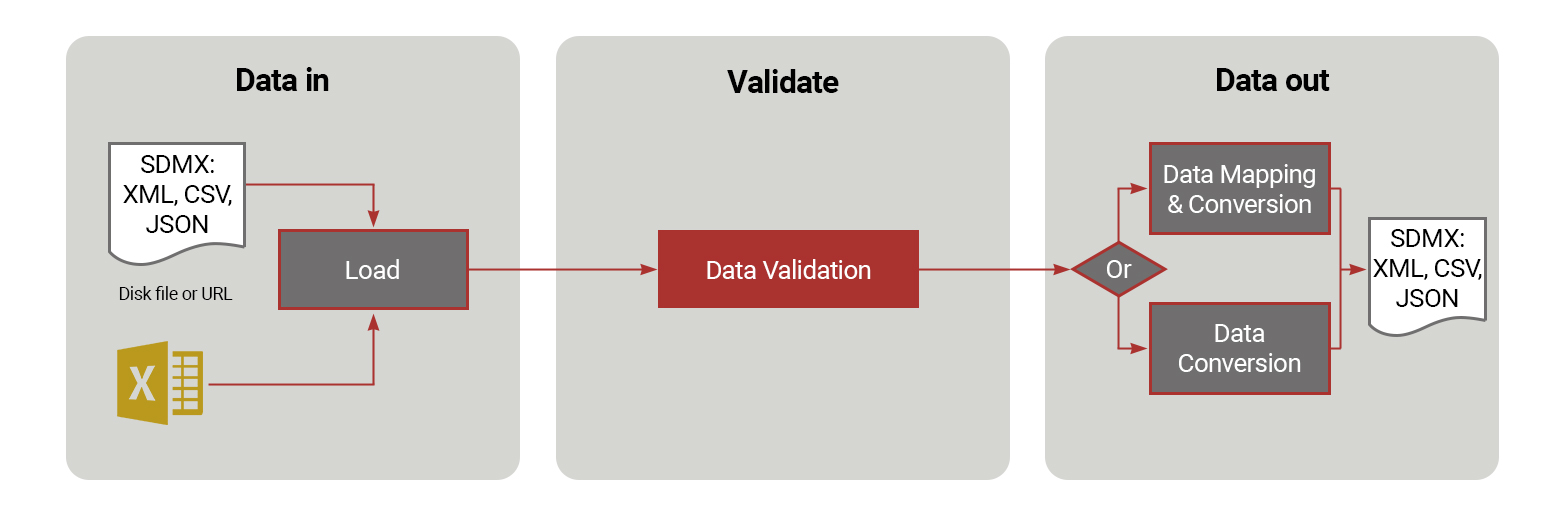
Pysdmx allows you to return the written data as a string or write it to a file. SDMX-CSV writers only allow one dataset to be written at a time, while SDMX-ML writers allow multiple datasets to be written at once.
We'll examine each of these writers on the screens that follow.
Writing data using SDMX-CSV 2.0

Write data to SDMX-CSV 2.0 format.
Parameters:
- datasets (Sequence[PandasDataset]) – List of datasets to write. Must have the same components.
- output_path (Optional[str]) – Path to write the data to. If None, the data is returned as a string.
Return type: Optional[str]
Returns: SDMX CSV data as a string, if output_path is None.
from pysdmx.io.csv.sdmx20.writer import write
from pathlib import Path

# Write to file sample.csv in the same folder as this code
file_path = Path(__file__).parent / "sample.csv"
write(dataset, file_path)
Writing data using SDMX-ML 2.1
For each dataset, if dataset.structure is not a Schema, the writer can only write in the Structure Specific All Dimensions format. We perform a check to ensure that the dataset has a Schema structure for the remaining formats as we need to know the roles for each component. This check also ensures that the dataset.structure has at least one dimension and one measure defined.
Select each example for details.

pysdmx.io.xml.sdmx21.writer.generic.write(datasets, output_path=’’, prettyprint=True, header=None, dimension_at_observation=None)
Write data to SDMX-ML 2.1 Generic format.
Parameters:
- datasets (Sequence[PandasDataset]) – The datasets to be written.
- output_path (str) – The path to save the file.
- prettyprint (bool) – Prettyprint or not.
- header (Optional[Header]) – The header to be used (generated if None).
- dimension_at_observation (Optional[Dict[str, str]]) – The mapping between the dataset and the dimension at observation.
Return type: Optional[str]
Returns: The XML string if path is empty, None otherwise.

pysdmx.io.xml.sdmx21.writer.structure_specific.write(datasets, output_path=’’, prettyprint=True, header=None, dimension_at_observation=None)
Write data to SDMX-ML 2.1 Structure Specific format.
Parameters:
- datasets (Sequence[PandasDataset]) – The datasets to be written.
- output_path (str) – The path to save the file.
- prettyprint (bool) – Prettyprint or not.
- header (Optional[Header]) – The header to be used (generated if None).
- dimension_at_observation (Optional[Dict[str, str]]) – The mapping between the dataset and the dimension at observation.
Return type: Optional[str]
Returns: The XML string if path is empty, None otherwise.
from pysdmx.io.xml.sdmx21.writer.generic import write as write_generic  # For Generic format
from pysdmx.io.xml.sdmx21.writer.structure_specific import write  # For StructureSpecific format
from pathlib import Path

# List of datasets to write
datasets = [dataset1, dataset2]

# Dimension at observation mapping (do not need to set them all if not needed
dim_mapping = {
    "DataStructure=TEST_AGENCY:TEST_ID(1.0)": "TIME_PERIOD"
}

# Write to file sample.xml in the same folder as this code
file_path = Path(__file__).parent / "sample.xml"
write(datasets, file_path, dimension_at_observation=dim_mapping)  # This will write a Dataset in Series and another in AllDimensions format
What do you know?
It's time to test your knowledge. Which of the following only allows one dataset to be written at a time?
Select your answer and then select Submit.
Pysdmx allows you to return the written data as a string or write it to a file. SDMX-CSV writers only allow one dataset to be written at a time, while SDMX-ML writers allow multiple datasets to be written at once.
The correct answer is option 3.
Pysdmx allows you to return the written data as a string or write it to a file. SDMX-CSV writers only allow one dataset to be written at a time, while SDMX-ML writers allow multiple datasets to be written at once.
Coming next
In the next unit, we'll focus on one of the core features of the pysdmx library – retrieving metadata from an SDMX Registry in either a synchronous or asynchronous fashion.
Need help finding something? I am an AI Assistant that's here to help!
Welcome to SDMX AI assistant
What are you looking for?
By using this AI-powered service ("Service"), you acknowledge and agree to the following:
This Service uses generative AI to assist with statistical analysis and research. While the Service strives to deliver useful information, the output ("Output") may contain inaccuracies, omissions, or biases. The Output is provided for informational purposes only and should not be considered professional advice. You remain responsible for how you interpret and use the Output.
The BIS makes no warranties regarding the accuracy or completeness of the Output and accepts no liability for any loss or damage resulting from its use.
Do not include or share personal, private, confidential or proprietary information when using the Service.
By using this technology, you agree to the Terms and Conditions.
How the assistant can help you
Understand SDMX standards
Ask and get clear explanations about SDMX standards.
Navigate the website
Find tools and documentation on website quickly.
Explore SDMX tools
Ask about API, software and libraries supporting SDMX.
Access documentation
Locate technical guides, specifications, and FAQs.